About Hart Voting Systems
For the November 7, 2023 General Election the Ulster County Board of Elections will be unveiling new voting systems, switching from our longtime vendor Dominion to Hart Intercivic. Our new systems include an ADA compliant Ballot Marking Device called a “Verity Touch Writer” and a “Verity Scan.” Many people have asked how the new machines will affect their voting experience and the answer is very little. After checking in, you will still mark a verifiable paper ballot using the Verity Touch Writer, or as before at a Privacy voting station, that then will be inserted into a scanner just like before.
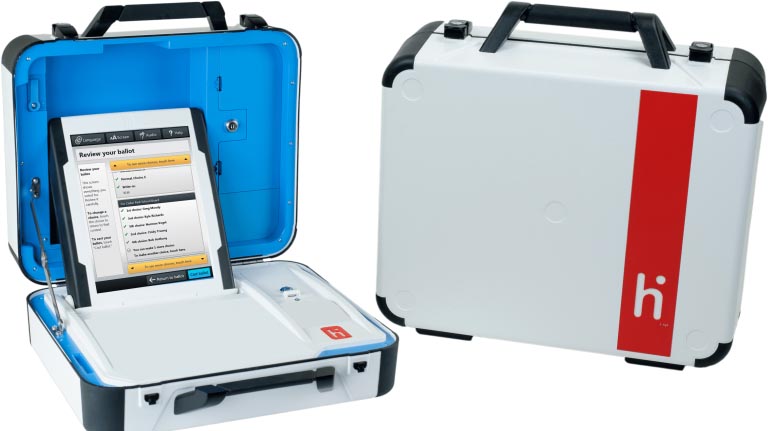
Voting with Verity (Verity Touch Writer and Scan)
Voters in Ulster County will now use a secure, accurate and easy-to-use voting system called Verity® Voting. This system is federally certified and meets New York State’s most stringent standards.
To cast your ballot in the polling place, you mark your choices on the ballot; then insert the ballot into the scanning device. You know your ballot was successfully cast when you the machine displays the image of the American flag on the touchscreen.
Verity is user-friendly and provides an accessible device that enables all voters, including those with disabilities, to mark their ballots privately and independently. This accessible ballot marking device includes an audio ballot reader and accommodates adaptive devices such as a sip-and-puff.
Frequently asked questions
A: Yes, for ballot marking device use for ADA voters. Plain language, step-by-step instructions on the scanning machine and the ballot marking device touchscreens walk you through the entire voting process. The accessible ballot marking device includes ADA-compliant accessibility features such as tactile buttons, audio ballots, and compatibility with common adaptive devices. The scanning machine provides on-screen instructions and controls for voters whose hand-marked ballots contain errors. However, for voters who do not require ADA, ballot marking device technology the use of hand marked paper ballots will be utilized at both early voting and election day polling locations.
A: Yes. Someone will be there to help you, but the system is designed to be easy for you to use without assistance. If your eyesight is poor or you have difficulty reading the ballot for some other reason, headphones are available so the entire ballot, including your selections, can be read to you. If you cannot make your selections by using the touchscreen, you can use accessibility features such as the device’s rotary wheel and button or a standard two-button device, such as jelly switches or a “sip and puff” device. In addition, a Help button is on every screen.
A: There is no way for the system to connect your vote to you. The process of voting is completely removed from the process of checking in and being qualified to vote. When you vote, no personal identifying information is connected with your ballot.
A: Extensive testing is performed before each election to verify the integrity of installed software and to ensure that the system is recording votes correctly. Additionally, the system uses paper ballots. Every voter uses the scanning machine to cast a paper ballot, regardless of whether the voter hand-marks the ballot or prints it from the ballot marking device. That original paper ballot is retained throughout the process and remains the official record of the vote.
A: Your vote is not officially cast until after you select the Cast ballot button and the machine displays the “Your vote has been recorded” screen. At that point, it is no longer possible for you to make any changes. However, if you change your mind before you cast your ballot, you can change your selections. When using the ballot marking device, a ballot review screen appears before you print your ballot. This screen lists all the choices you have made and lets you know if you missed voting in any race. From this screen, you can return to any contest on the ballot and change your selections, if you wish. If you want to change your ballot selections after you have hand-marked or printed your ballot, you can ask a poll worker to “spoil” the ballot and issue you a new ballot.
A: It is your decision and right to choose not to vote in any race. If you are hand-marking the ballot, simply skip the race(s) you do not wish to vote in. If you are using the ballot marking device, just select the Next button to move forward past any race you want to skip.
A: If you are hand-marking your ballot and mark more than the permitted number of votes in a race, the scanning machine will return your ballot, and the touchscreen will display a message indicating any races that have too many choices marked. You may request a new ballot to mark, or touch “Cast the ballot as is.” If you choose “Cast the ballot as is,” your vote will not count in that race. If you are using the ballot marking device, the system does not allow you to select more than the permitted number of votes in a race.
A: After you insert the ballot into the scanning machine and the ballot is scanned, the screen will display the American flag and the message “Your vote has been recorded”, and an audible chime sounds. This lets you know your vote has been cast and counted.
A: No, your vote cannot be lost once you have scanned the ballot with the scanning machine and the machine displays the “Your vote has been recorded” screen. Your vote is stored in three separate places, and all data is protected and cannot be lost in the unlikely event that the system fails. In addition, the voting machine has a built-in battery back-up power, so it will continue to function even if the main power supply fails.
A: The system provides election officials with images of every vote that was cast on each voting device. Election officials can use these cast vote record images to electronically recount votes and ensure that results are accurate. Officials can also conduct a manual recount of paper ballots.
A: Yes. Every voter uses the scanning machine to cast a paper ballot, regardless of whether the voter hand-marks the ballot or prints it from the ballot marking device. That original paper ballot is retained throughout the process and remains the official record of the vote.